

This guide is in English for now. The tool itself works in your language.
How to make a quotation or estimate
A quotation tells a customer what you will charge before they order. Make it here, send it as a PDF, and when they say yes turn it into an invoice with one click.
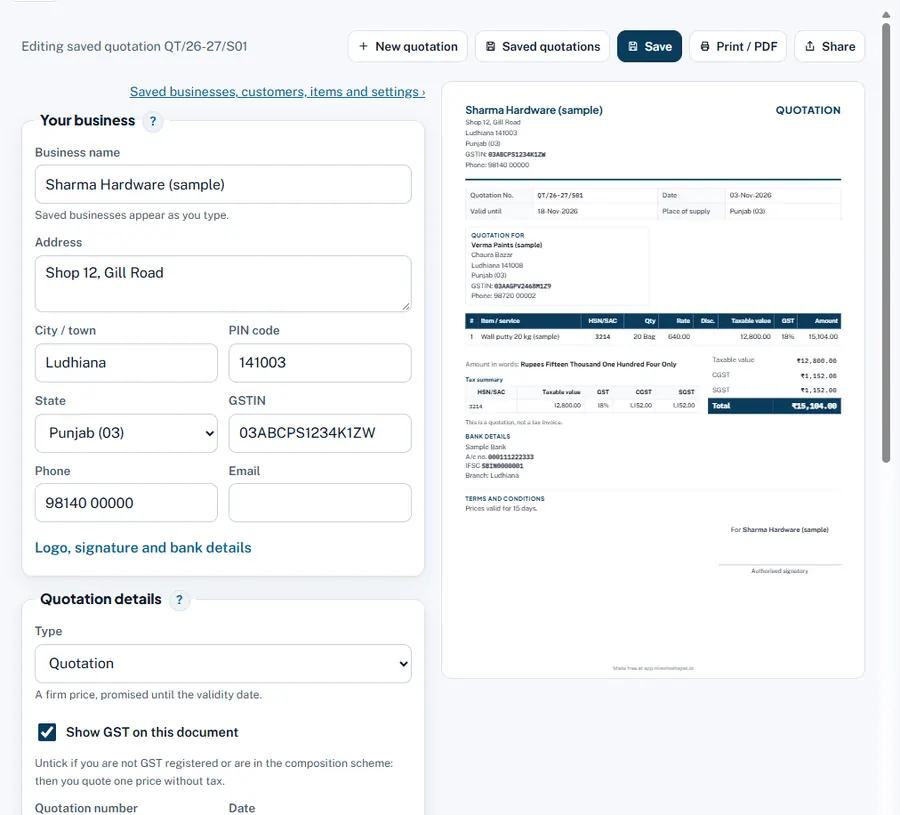
Step by step
- Choose Quotation or Estimate. Under Quotation details, Type. Each has its own number series.
- Number, date and Valid until. Give a validity date (often 15 or 30 days). Add the customer's Enquiry reference if they sent one.
- Customer. Pick a saved customer or type the name and address.
- GST or not. Tick Show GST on this document to show tax lines like an invoice; untick for a simple price list style estimate.
- Items. Description, HSN, quantity, unit, rate, discount and GST, as on an invoice.
- Terms and conditions. Payment terms, delivery time, validity, freight extra or included.
- Save and Share. The status starts as Waiting for reply.
Worked example
Verma Paints asks for 20 bags of wall putty. Quotation QT/26-27/S01: 20 Bag × ₹640 = ₹12,800 + GST 18% ₹2,304 = ₹15,104, valid 15 days, "Delivery within 3 days, freight extra".
Common mistakes and how to fix them
- Rates shown with GST and GST added again. Rate is before GST when Show GST is ticked.
- No validity date. Prices change; always give one.
Try it now: it is free and needs no login.Open the quotation maker
Related help
Quotation to invoice in one clickWhen the customer accepts, do not type the quotation again. One click copies the customer and every line into a new…Print, PDF, WhatsApp and designsA saved quotation can be printed on paper, saved as a PDF, or sent straight to the customer on WhatsApp or e-mail. Pick…Guide: quotation vs estimate vs proforma